
Clear face
Someone should understand what you look like without zooming in or comparing faces in a group.
Hinge first photo
Use a clear, current, solo face photo first. The opening photo should make you easy to recognize before the rest of the Hinge lineup adds style, body, activity, and personality.
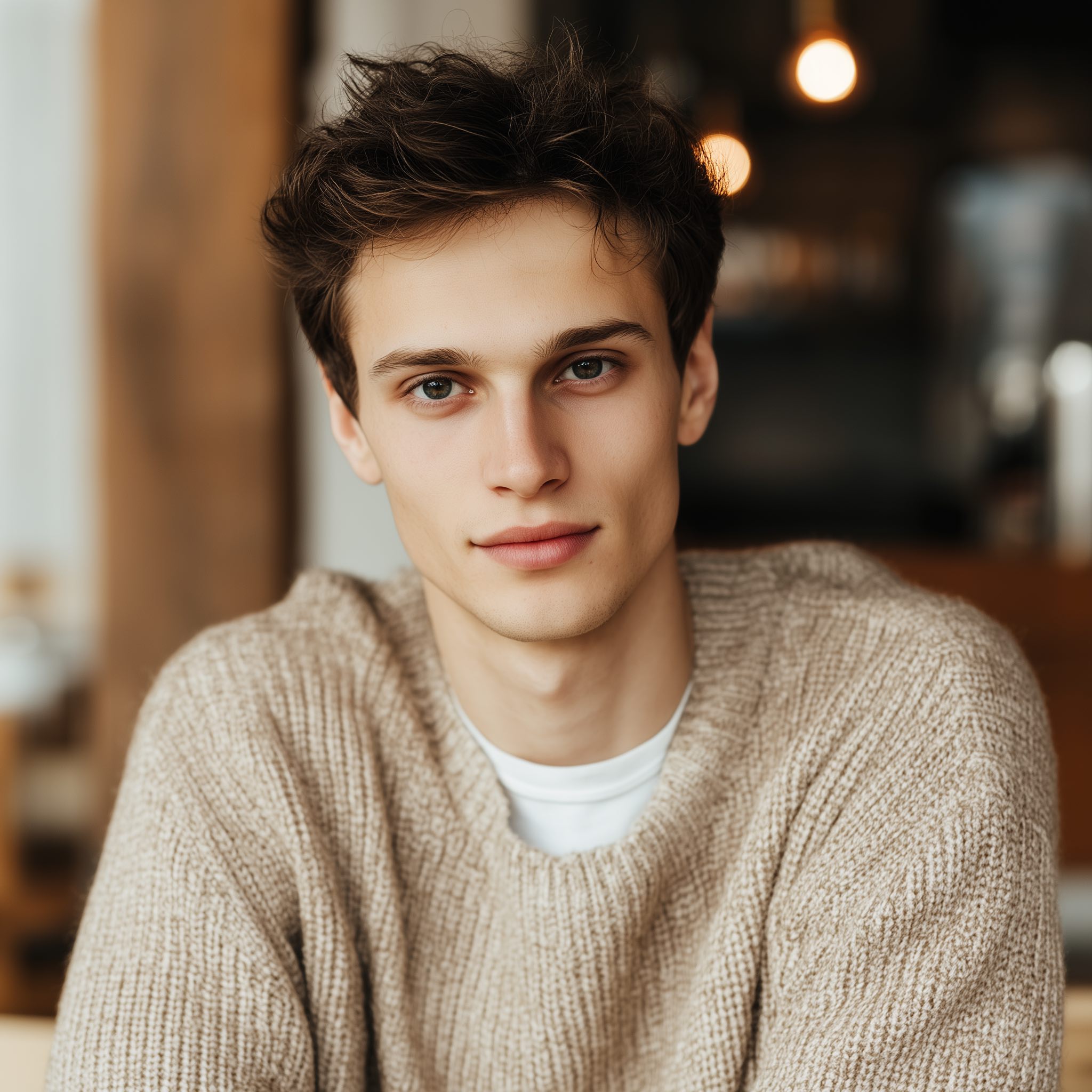
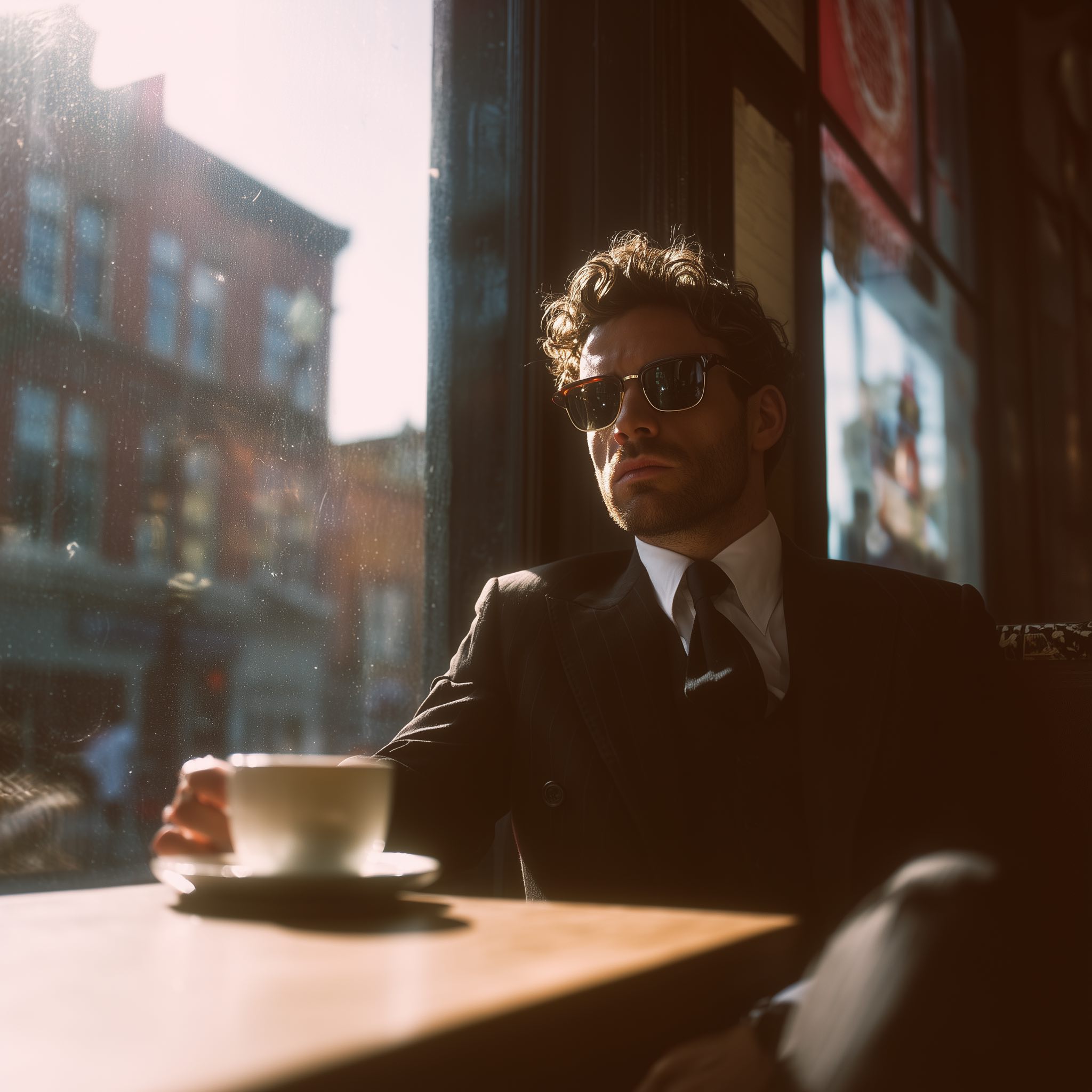
Created with VIBEFLIRTING. Separate illustrative portraits.
Short answer
Compare the two portraits above. In the close portrait, both eyes and the expression are visible. In the café photo, sunglasses and shade hide them. That is the distinction to look for in your own photos: choose the image that shows your face clearly.
Use the same comparison for your own first photo. Also check that your haircut, facial hair and overall appearance are current. A striking setting is useful later if the picture still shows you clearly.
Try it with your photos
Imagine these three photos in your camera roll.
| Candidate | Decision and reason |
|---|---|
| A: a recent solo portrait in daylight | Start here. Your face is clear and your appearance is current. |
| B: a travel photo in sunglasses | Consider it later. It can show an actual interest, but it hides your eyes. Keep it only if you are still easy to identify. |
| C: a sharp portrait with an old haircut and a different build | Replace it. Good lighting cannot make an outdated photo show what you look like today. |
Compare them at the size they appear on your phone. Choose the one where your face and expression are easier to see. If both pass, ask a friend who sees you regularly which looks most like you now. Use that as your starting photo, and keep the other for later if it adds something different.
If none is clear and current, take a new solo photo before rearranging the rest. The self-shoot guide is a useful place to start.
Checklist
Someone should understand what you look like without zooming in or comparing faces in a group.
Hair, facial hair, weight, style, and age should match what someone would see if they met you soon.
Group shots create friction in the first slot. Use friends or social proof later if the photo is actually good.
You do not need a huge smile. You do need to look approachable, relaxed, and believable.
The first photo should not make the setting louder than your face. Clean context beats visual clutter.
It should fit beside the rest of your profile and show the same person someone would meet today.
What to avoid
Virtual photoshoots
A virtual photoshoot gives you more portraits to choose from when your current set is mostly awkward crops, dim lighting or selfies. Compare each result with your real appearance and keep only the ones that look like you. The same first-photo checks still apply.
VIBEFLIRTING accepts any 2–4 clear source photos. For best results, use 2–3 recent headshots whose crop, angle, lighting, appearance, outfit, and backdrop closely match each other and the first-photo style you want. Add 1 clear, uncluttered full-body photo for your current build. Then reject any candidate that looks too polished, too old, too different, or too good to be believable. Use the current source-photo checklist before your virtual photoshoot.
After photo one
Once the first slot is clear, use the rest of the profile to add useful details: a wider view, your usual style, an actual hobby, and something a match could ask about. Hinge currently requires four to six photos depending on local requirements. Follow the requirement shown in your app, and give each photo a reason to be there.
For the full sequence, read the Hinge photos guide. For more first-photo examples across dating apps, use the dating photo examples guide.
FAQ
A relaxed smile can work, but do not force one. Pick a clear, current photo with an expression that feels like you. See the guide to smiling in your first photo for more examples.
Yes, if it is clear, current and shows your face without distortion or a phone blocking it. Use other photos to show more than the same close-up. The first-Hinge-selfie guide explains what to check.
After a clear first portrait, add a wider view and real interests or activities. Avoid several near-identical close-ups. Use the Hinge photo-order guide to review the full lineup.
If Top Photo is enabled, Hinge tests your uploaded photos and puts its predicted strongest photo first. The order others see can differ from your Edit or View screen. You can turn Top Photo off in Edit Profile to choose the lead yourself. See Hinge’s Top Photo instructions for the current steps.
Ready when you are